Mobile app for editing PDFs and viewing Office documents
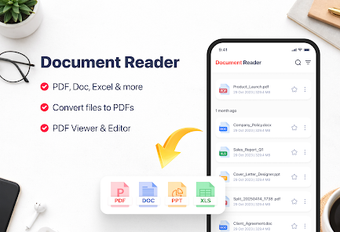
Edits live PDF text on-device, inserts signatures, and opens Word, Excel, and PowerPoint files. PDF Text Edit: Office Reader, from Lpng dev ina, combines PDF text editing with an office-file viewer in a single Android app. Key capabilities include direct text changes in PDFs, form filling, annotation tools, and an integrated file manager for scanned documents. It fits mobile professionals and students who need quick document fixes and on-the-go review without a desktop.
What is this app actually used for in daily work?
The app targets document correction and review: you can tap existing, selectable PDF text to change, delete, or replace content, add images, and place a personal signature for approvals. It also opens Word, Excel, and PowerPoint files, so a single workflow handles client drafts, spreadsheets, and slide decks. The integrated file manager scans the device and lets you search, filter, and mark Favorites to keep items ready for meetings.
How does it support core document workflows and output?
The core flow moves from opening a file in the viewer to editing or annotating on the same screen, then saving the revised PDF. Annotation tools include highlighting, underlines, strike-through, freehand drawing, and comments for review cycles. Form filling supports checkmarks, text fields, and simple controls. The app saves signed pages and edited text back into the PDF, producing an updated file for sharing or archiving without printing.
Is the interface and compatibility suitable for professional use?
The interface groups file discovery, editor, and signer into one app, which reduces app switching during a workflow. The editor requires PDFs with selectable text to change content, so scanned-image-only PDFs need text recognition elsewhere. Office-format support covers DOC/DOCX, XLS/XLSX, and PPT/PPTX, which preserves the need to exchange files with colleagues who use standard office suites. Performance aims for fast page loading even on older Android hardware.
A capable mobile document tool with a clear limitation
PDF Text Edit: Office Reader is suitable for professionals who need to correct text inside PDFs and handle common office files on Android. Editing depends on PDFs having selectable text, which limits use with image-only scans unless text recognition is applied first. The app performs the core tasks of on-device editing, signing, and file management reliably, making it a practical fit for mobile review and light document maintenance.